Menue |

Toning & Lettering on Computer
Printing
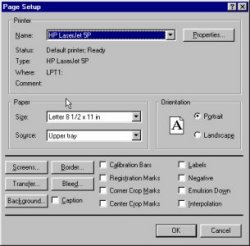
Page setupPrinting is where you get to see the fruits of your labor, when it all comes together; the secret of successfully imitating those adhesive plastic dot screens is in the printer settings. Save the file as something other than a GIF, BMP, or a JPEG, since you want a file format which preserves the printer settings and is not compressed. In Photoshop, open the File => Page Setup option to see a dialogue window like the one on the right. Go down and click on the button marked Screen.
|
|
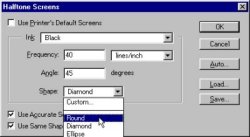
When you click the Screen button you should see a dialogue box like the one on the right. Initially the options will be grayed out, and there will be a check in the checkbox labeled Use Printer Default Screens. Uncheck that box so you can select other options. My recommendations are Shape: Round, Angle: 45 Degrees, and Frequency somewhere between 30 and 60 lines per inch, depending on how much reduction is necessary, and how crappy the reproduction method is for the magazine (or whatever) which your graphic is intended for. At the end of this article I will print the example panel at 100% with various line weights set to illustrate some of the various settings. |